quinta-feira, 9 de junho de 2016
Curso WinDev - Tabela - 029 - Tabela - Descricao, em Varias Linhas Coluna Tabela
Video Youtube
Nessa aula vou mostrar como mostrar numa coluna um nome completo na coluna
This lesson will show how to show a full name column column
Cette leçon va vous montrer comment afficher une colonne de la colonne de nom complet
Doc.windev.com/en-US/?3074009&name=functions_for_managing_the_table_controls
Doc.pcsoft.fr/fr-FR/?3074009&name=fonctions_gestion_des_champs_table
WinDev - Tabela - 001/... Ancorar Tabela e coluna
WinDev - Tabela - 002/... Esconder ou Mostrar Coluna Tabela
WinDev - Tabela - 003/... Mudar Cor e Fundo da Coluna da Tabela
WinDev - Tabela - 004/... Mudar Largura e Fonte da Coluna da Tabela
WinDev - Tabela - 005/... Coluna de valor Deixar em Branco
WinDev - Tabela - 006/... Alterar Nome,Cor,Cor de Fundo da Coluna da Tabela
WinDev - Tabela - 007/... Alterar ordem das Colunas por Programacao
WinDev - Tabela - 008/... TableSeek Pesquizar se Existe
WinDev - Tabela - 009/... TableSelectPlus - Seleciona Iten tabela
WinDev - Tabela - 010/... TableSort - Classifica Coluna
WinDev - Tabela - 011/... Zoom
WinDev - Tabela - 012/... for Each Row Of - Percorrer
WinDev - Tabela - 013/... Selecionar Varias Linhas
WinDev - Tabela - 014/... Balao - Tabela ToolTip
WinDev - Tabela - 015/... Coluna Contrainer
WinDev - Tabela - 016/... Sum - Como Mudar Nome
WinDev - Tabela - 017/... TableInfoXY - Saber Nome,Posição e Linha da Coluna
WinDev - Tabela - 018/... Guardar e Recuperar Posição Tabela
WinDev - Tabela - 019/... TableInputsearch
WinDev - Tabela - 020/... Descobrir Posição cliente Novo
WinDev - Tabela - 021/... Saber quantos e nome das Colunas
WinDev - Tabela - 022/... Tableselect - Selecionar varias linhas tabela e Ler
WinDev - Tabela - 023/... BuildBrowsingTable - Cria Tabela Manual
WinDev - Tabela - 024/... Somar Valor Tabela Automatico ou Manual - rowtotal
WinDev - Tabela - 025/... Eventos no cabecalho da Tabela
WinDev - Tabela - 026/... Tabela - Break - Totalizadores
WinDev - Tabela - 027/... Tabela - Colorir Linha
WinDev - Tabela - 028/... Double click Na seleção Item
WinDev - Tabela - 029/... Tabela - Descrição, Em Varias Linhas Coluna Tabela
WinDev - Tabela - 030/... Tabela - Fazer titulos com colunas
WinDev - Tabela - 031/... Tabela - Sql - Query - Agrupar Datas Nas Notas
quarta-feira, 8 de junho de 2016
WX - Objetivo: Anexar qualquer tipo de arquivo (TXT, PDF, Word, Excel e outros tipos de documentos) no banco de dados
forum.pcsoft.fr/pt-BR/pcsoft.br.windev/1279-objetivo-anexar-qualquer-tipo-arquivo-txt-pdf-word/read.awp
Publicado em junho, 08 2016 - 2:23 AM
Prezados,
Autor do Post: Evandro Rodrigues de Andrade
Objetivo: Anexar qualquer tipo de arquivo (TXT, PDF, Word, Excel e outros tipos de documentos) no banco de dados.
Observação: O documento ou arquivo é salvo no banco e não no diretório.
Como vai funcionar:
1º - Selecionar o arquivo em um botão
2º - Depois de selecionado gravar o arquivo na tabela do banco de dados e exibir uma mensagem: "Arquivo adicionado com sucesso."
3º - Listar em seguida todos os arquivos anexados no banco de dados
4º - Um botão abrir ou baixar ou exportar o documento selecionado da tabela.
Sendo assim segue os códigos:
1º - Procedure para mostrar anexos na tabela:
Procedure MostrarAnexos( )
TableDeleteAll(TABLE_arquivos_em_anexo)
FOR EACH arquivos
nIDArquivo is 8-byte int = arquivos.id_arquivo
sInformacaoArquivoBinario is string = HInfoMemo(arquivos,arquivo_anexo)
sNomeArquivo is string = fExtractPath(ExtractString(sInformacaoArquivoBinario,2,TAB), fFileName + fExtension)
dtData is DateTime = fDateTime(ExtractString(sInformacaoArquivoBinario,2,TAB))
sExtensaoArquivo is string = Replace((fExtractPath(ExtractString(sInformacaoArquivoBinario,2,TAB), fExtension)),".","")
//sTamanho is string = fSize(ExtractString(sInformacaoArquivoBinario,2,TAB))
sTamanho is string = ExtractString(sInformacaoArquivoBinario,3,TAB)
TableAdd(TABLE_arquivos_em_anexo,nIDArquivo+TAB+sNomeArquivo+TAB+dtData+TAB+sExtensaoArquivo+TAB+sTamanho)
END
TableSort(TABLE_arquivos_em_anexo,"-TABLE_arquivos_em_anexo.COL_Id_do_anexo")
TableDeleteAll(TABLE_arquivos_em_anexo)
FOR EACH arquivos
nIDArquivo is 8-byte int = arquivos.id_arquivo
sInformacaoArquivoBinario is string = HInfoMemo(arquivos,arquivo_anexo)
sNomeArquivo is string = fExtractPath(ExtractString(sInformacaoArquivoBinario,2,TAB), fFileName + fExtension)
dtData is DateTime = fDateTime(ExtractString(sInformacaoArquivoBinario,2,TAB))
sExtensaoArquivo is string = Replace((fExtractPath(ExtractString(sInformacaoArquivoBinario,2,TAB), fExtension)),".","")
//sTamanho is string = fSize(ExtractString(sInformacaoArquivoBinario,2,TAB))
sTamanho is string = ExtractString(sInformacaoArquivoBinario,3,TAB)
TableAdd(TABLE_arquivos_em_anexo,nIDArquivo+TAB+sNomeArquivo+TAB+dtData+TAB+sExtensaoArquivo+TAB+sTamanho)
END
TableSort(TABLE_arquivos_em_anexo,"-TABLE_arquivos_em_anexo.COL_Id_do_anexo")
2º - Botão para adicionar anexos no banco:
// Abre o selecionador de arquivo
sArquivo is string
sArquivo = fSelect("", "", "Selecione um arquivo...", "Todos (.)" + TAB + "*.*", "*.*")
IF sArquivo ~= “” THEN
RETURN
END
// Anexa um arquivo para o registro
HLinkMemo(arquivos,arquivo_anexo,sArquivo,hAcceptOpenedFile)
// Adiciona o registro
HAdd(arquivos)
MostrarAnexos( )
sArquivo is string
sArquivo = fSelect("", "", "Selecione um arquivo...", "Todos (.)" + TAB + "*.*", "*.*")
IF sArquivo ~= “” THEN
RETURN
END
// Anexa um arquivo para o registro
HLinkMemo(arquivos,arquivo_anexo,sArquivo,hAcceptOpenedFile)
// Adiciona o registro
HAdd(arquivos)
MostrarAnexos( )
3º - Botão para abrir o anexo selecionado na tabela:
//abrir o anexo selecionado na tabela
HSeekFirst(arquivos,id_arquivo,TABLE_arquivos_em_anexo.COL_Id_do_anexo)
sInformacaoArquivoBinario is string
IF HFound() = True THEN
// Retorna as características de memorandos binários e texto
sInformacaoArquivoBinario = HInfoMemo(arquivos,arquivo_anexo)
sArquivo is string = fExtractPath(ExtractString(sInformacaoArquivoBinario,2,TAB), fFileName + fExtension)
sArquivoTemporario is string = fTempPath() + sArquivo
// Extrai o arquivo para um diretório temporario
HExtractMemo(arquivos.arquivo_anexo,sArquivoTemporario)
// Recuperar o nome do diretório temporário e executa ou abre o arquivo em seguida
ShellExecute(sArquivoTemporario)
ELSE
Error("Arquivo não encontrado ou o arquivo pode ser aberto ou executado.")
END
HSeekFirst(arquivos,id_arquivo,TABLE_arquivos_em_anexo.COL_Id_do_anexo)
sInformacaoArquivoBinario is string
IF HFound() = True THEN
// Retorna as características de memorandos binários e texto
sInformacaoArquivoBinario = HInfoMemo(arquivos,arquivo_anexo)
sArquivo is string = fExtractPath(ExtractString(sInformacaoArquivoBinario,2,TAB), fFileName + fExtension)
sArquivoTemporario is string = fTempPath() + sArquivo
// Extrai o arquivo para um diretório temporario
HExtractMemo(arquivos.arquivo_anexo,sArquivoTemporario)
// Recuperar o nome do diretório temporário e executa ou abre o arquivo em seguida
ShellExecute(sArquivoTemporario)
ELSE
Error("Arquivo não encontrado ou o arquivo pode ser aberto ou executado.")
END
4º - Botão para exportar o arquivo:
//Exportar
HSeekFirst(arquivos,id_arquivo,TABLE_arquivos_em_anexo.COL_Id_do_anexo)
sInformacaoArquivoBinario is string
sArquivo is string
sExtensaoArquivo is string
sDiretorio is string
// Retorna as características de memorandos binários e texto
sInformacaoArquivoBinario = HInfoMemo(arquivos,arquivo_anexo)
sArquivo = fExtractPath(ExtractString(sInformacaoArquivoBinario,2,TAB), fFileName + fExtension)
sExtensaoArquivo = fExtractPath(ExtractString(sInformacaoArquivoBinario,2,TAB), fExtension)
//sDiretorio = fSelect("", sArquivo, "Salvar como...", sExtensaoArquivo, sExtensaoArquivo, fselCreate + fselExist)
sDiretorio = fSelect("", sArquivo, "Salvar como...", "Todos os arquivos (*"+sExtensaoArquivo+")" + TAB + "*"+sExtensaoArquivo+"*", "", fselCreate + fselExist)+sExtensaoArquivo
HExtractMemo(arquivos,arquivo_anexo,sDiretorio)
HSeekFirst(arquivos,id_arquivo,TABLE_arquivos_em_anexo.COL_Id_do_anexo)
sInformacaoArquivoBinario is string
sArquivo is string
sExtensaoArquivo is string
sDiretorio is string
// Retorna as características de memorandos binários e texto
sInformacaoArquivoBinario = HInfoMemo(arquivos,arquivo_anexo)
sArquivo = fExtractPath(ExtractString(sInformacaoArquivoBinario,2,TAB), fFileName + fExtension)
sExtensaoArquivo = fExtractPath(ExtractString(sInformacaoArquivoBinario,2,TAB), fExtension)
//sDiretorio = fSelect("", sArquivo, "Salvar como...", sExtensaoArquivo, sExtensaoArquivo, fselCreate + fselExist)
sDiretorio = fSelect("", sArquivo, "Salvar como...", "Todos os arquivos (*"+sExtensaoArquivo+")" + TAB + "*"+sExtensaoArquivo+"*", "", fselCreate + fselExist)+sExtensaoArquivo
HExtractMemo(arquivos,arquivo_anexo,sDiretorio)
5º - Código para filtrar na tabela:
//filtrar na tabela:
TableEnableFilter(TABLE_arquivos_em_anexo.COL_Nome,filterContains,MySelf)
O código foi feito conforme os links que você Adriano me passou
Agradecimentos especiais: Prof.º Adriano Boller, Prof.º Amarildo Matos e Prof.º Julio Cesar Pedroso
Autor do Post: Evandro Rodrigues de Andrade
- Meu muito obrigado a todos!

--
Adriano José Boller
______________________________________________
Consultor e Representante Oficial da
PcSoft no Brasil
+55 (41) 9949 1800
adrianoboller@gmail.com
skype: adrianoboller
http://wxinformatica.com.br/
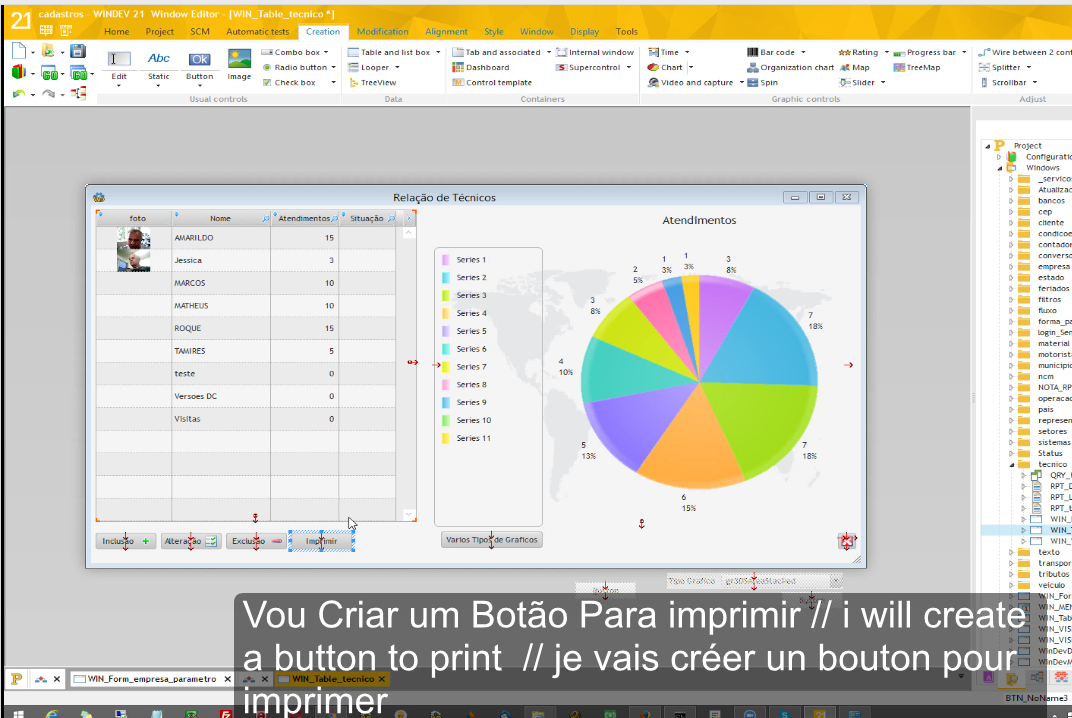
Windev - Curso Relatorio - 24/... - Relatorio - Imprimir Tabela com - TablePrint
Video Youtube
Nessa aula vou mostrar como imprimir uma tabela com comando TablePrint
This lesson will show how to print a table with TablePrint command
Cette leçon va vous montrer comment imprimer une table avec commande TableImprime
http://doc.windev.com/en-US/?1000017237&name=TablePrint
http://doc.pcsoft.fr/fr-FR/?1000017237&name=tableimprime_fonction
Blog - WinDev - Relatorio - 001/... Configura e Filtro
Blog - WinDev - Relatorio - 002/... IParameterReport
Blog - WinDev - Relatório - 003/... Marca D´Agua
Blog - WinDev - Relatorio - 004/... Layout
Blog - WinDev - Relatorio - 005/... Campo Vertical - Angle
Blog - WinDev - Relatorio - 006/... Como fazer quando sai duas paginas?
Blog - WinDev - Relatorio - 007/... Imprimir Linha Multi Line
Blog - WinDev - Relatorio - 008/... Relatorio Valor Zero deixar Branco
Blog - WinDev - Relatorio - 009/... Relatorio Alinhar Texto
Blog - WinDev - Relatorio - 010/... Colocar Totalizador
Blog - WinDev - Relatorio - 011/... Imprime Somente os Selecionados ou Todos da Tabela
Blog - WinDev - Relatorio - 012/... Break e totalizadores de valores
Blog - WinDev - Relatorio - 013/... Retorno de Relatorio - Result
Blog - WinDev - Relatorio - 014/... Zerar Totalizador
Blog - WinDev - Relatorio - 015/... Relatorio - Totalmente Manual
Blog - WinDev - Relatorio - 016/... Linha Zebrada
Blog - WinDev - Relatorio - 017/... Posicoes do Relatorio Alterar
Blog - WinDev - Relatorio - 018/... Alterar Fonte
Blog - WinDev - Relatorio - 019/... Linha Acrescentar
Blog - WinDev - Relatorio - 020/... Relatorio - Gerar Pdf
Blog - WinDev - Relatorio - 021/... Filtro
Blog - WinDev - Relatorio - 022/... Pagina Inicial/Final - Data Hora
Blog - WinDev - Relatorio - 023/... Pular Página Break - IpageEnd()
Blog - WinDev - Relatorio - 024/... Imprimir Tabela com TablePrint
Blog - WinDev - Relatorio - 025/... Relatorio Mudar Orientação
//Vou Imprimir Tabela Sem gerar nenhum Relatorio
TablePrint(TABLE_tecnico)
//simples assim
Wx - Trabalhando com DLL de Terceiros
http://help.windev.com/en-US/?3014006&name=LoadDLL
http://help.windev.com/en-US/?3014003&name=CallDLL32
http://help.windev.com/en-US/?3014009&name=FreeDLL
Principal noção:
A) Carrega uma Dll na memória com LoadDLL (Function)
Ex.:
hInst is int
hInst = LoadDLL("MyDLL.DLL")
IF hInst = 0 THEN
Error(ErrorInfo())
ELSE
Info("DLL loaded")
FreeDLL(hInst)
END
Executa um metodo interno de uma DLL com CallDLL32 (Function)
Ex.;
CallDLL32("USER32", "SendMessageA", hWnd, wMsg, lParam1, lParam2)
C) Libera uma DLL com FreeDLL (Function)
hInst = LoadDLL("MyDLL.DLL")
IF hInst = 0 THEN
Error("Error during the unload operation")
ELSE
CallDLL32("MyDLL", "FunctionA", par1, par2)
CallDLL32("MyDLL", "FunctionB", par1)
FreeDLL(hInst)
END
http://help.windev.com/en-US/?3064006&name=ListDLL
API do Windows
http://help.windev.com/en-US/?3014005&name=API
e
http://help.windev.com/en-US/?1000019149&name=API_description
Ex.:
API("USER32", "SendMessageA", hWnd, wMsg, lParam1, lParam2)
<Result> = API(<DLL Name> , <Function Name> [, <Parameter 1> [, <Parameter 2> [, ...]]])
Código 34 é um erro de DLL
http://help.windev.com/en-US/?2425&name=ERR_NO_DLLEXE
Unable to load the <DLL_NAME> DLL. ERR_NO_DLLEXE (34)
http://help.windev.com/en-US/?2526&name=ERR_BAD_DLLEXE
The <DLL_NAME> DLL is not compatible with this version of WEBDEV. ERR_BAD_DLLEXE
--
Adriano Jose Boller
______________________________________________
Consultor e Representante Oficial da
PcSoft no Brasil
+55 (41) 9949 1800
adrianoboller@gmail.com
______________________________________________
http://forum.pcsoft.fr/fr-FR/pcsoft.br.windev/621-trabalhando-com-dll-terceiros/read.awp
http://help.windev.com/en-US/?3014006&name=LoadDLL
http://help.windev.com/en-US/?3014003&name=CallDLL32
http://help.windev.com/en-US/?3014009&name=FreeDLL
//OBS.:
//Inicialmente registre por dos comando: regsvr32.exe
//Nao sei se alguem precisa mais ai vai a solução:
//StringRetrieve(retornomemoria , srUNICODEAddress )
//alterei de
//srASCIIZAddress para srUNICODEAddress
//ficou assim:
retornomemoria is int = CallDLL32("spdNfeLib.dll","StatusDoServico",Caminhoini,1)
xmlretorno is string = StringRetrieve ( retornomemoria , srUNICODEAddress )
Info (xmlretorno)
//Sobre o calldll32 retorna somente inteiro ai para ler o retorno string precisei fazer dessa forma:
hInst is int = LoadDLL("nfe.dll")
//hInst = LoadDLL("spdNfeLib.dll")
IF hInst = 0 THEN
Error(ErrorInfo())
ELSE
nAddrASCIIZString is int = CallDLL32("nfe.dll", "VLK_ConsultaStatusWS", Caminhoini,1)
sStringContent is string = StringRetrieve ( nAddrASCIIZString , srASCIIZAddress )
Info(sStringContent)
//sRetorno is string = sString is string CallDLL32("nfe.dll","VLK_ConsultaStatusWS",caminhoini,1)
//CallDLL32("spdNfeLib.dll","StatusDoServico",caminhoini,1)
FreeDLL(hInst)
END
//O stringretrieve que converte de int para string
//Vejamos o seguinte exemplo:
//EM CLARION:
PUBLIC *CLASTRING FastQRCode(*CLASTRING,*CLASTRING)
//Obs.: é com ponteiro
//Não é uma simples string
//é um ponteiro de string
//com endereçamento de memoria
//Voce em que tomar cuidado para não mandar um caminhao entrar numa garagem de um fusca
//ai não da certo, a tipagem de campos algo bem sério para a questão da prototipação de Dlls de terceiros.
//em seu sistema, pois uma vez mal feito vai gerar excessoes, exceptions GPFs em seu sistema.
//A Dll deve ser encaixada corretamente em seu sistema
//A variavel do tipo VARIANT aceita qualquer coisa bem como a BUFFER na maioria dos casos
//Inicialmente registre por dos comando: regsvr32.exe
//Nao sei se alguem precisa mais ai vai a solução:
//StringRetrieve(retornomemoria , srUNICODEAddress )
//alterei de
//srASCIIZAddress para srUNICODEAddress
//ficou assim:
retornomemoria is int = CallDLL32("spdNfeLib.dll","StatusDoServico",Caminhoini,1)
xmlretorno is string = StringRetrieve ( retornomemoria , srUNICODEAddress )
Info (xmlretorno)
//Sobre o calldll32 retorna somente inteiro ai para ler o retorno string precisei fazer dessa forma:
hInst is int = LoadDLL("nfe.dll")
//hInst = LoadDLL("spdNfeLib.dll")
IF hInst = 0 THEN
Error(ErrorInfo())
ELSE
nAddrASCIIZString is int = CallDLL32("nfe.dll", "VLK_ConsultaStatusWS", Caminhoini,1)
sStringContent is string = StringRetrieve ( nAddrASCIIZString , srASCIIZAddress )
Info(sStringContent)
//sRetorno is string = sString is string CallDLL32("nfe.dll","VLK_ConsultaStatusWS",caminhoini,1)
//CallDLL32("spdNfeLib.dll","StatusDoServico",caminhoini,1)
FreeDLL(hInst)
END
//O stringretrieve que converte de int para string
//Vejamos o seguinte exemplo:
//EM CLARION:
PUBLIC *CLASTRING FastQRCode(*CLASTRING,*CLASTRING)
//Obs.: é com ponteiro
//Não é uma simples string
//é um ponteiro de string
//com endereçamento de memoria
//Voce em que tomar cuidado para não mandar um caminhao entrar numa garagem de um fusca
//ai não da certo, a tipagem de campos algo bem sério para a questão da prototipação de Dlls de terceiros.
//em seu sistema, pois uma vez mal feito vai gerar excessoes, exceptions GPFs em seu sistema.
//A Dll deve ser encaixada corretamente em seu sistema
//A variavel do tipo VARIANT aceita qualquer coisa bem como a BUFFER na maioria dos casos
Posté le 17 septembre 2015 - 17:16
Principal noção:
A) Carrega uma Dll na memória com LoadDLL (Function)
http://help.windev.com/en-US/?3014006&name=LoadDLL
<Result> = LoadDLL(<DLL Name>)
Ex.:
hInst is int
hInst = LoadDLL("MyDLL.DLL")
IF hInst = 0 THEN
Error(ErrorInfo())
ELSE
Info("DLL loaded")
FreeDLL(hInst)
END
Executa um metodo interno de uma DLL com CallDLL32 (Function)http://help.windev.com/en-US/?3014003&name=CallDLL32
<Result> = CallDLL32(<DLL Name>, <Function Number> [, <Parameter 1> [, <Parameter 2> [, ... ]]])
Ex.;
CallDLL32("USER32", "SendMessageA", hWnd, wMsg, lParam1, lParam2)
C) Libera uma DLL com FreeDLL (Function)
http://help.windev.com/en-US/?3014009&name=FreeDLL
Ex.:
hInst = LoadDLL("MyDLL.DLL")
IF hInst = 0 THEN
Error("Error during the unload operation")
ELSE
CallDLL32("MyDLL", "FunctionA", par1, par2)
CallDLL32("MyDLL", "FunctionB", par1)
FreeDLL(hInst)
END
Posté le 17 septembre 2015 - 17:21
|
Outros links:
Selecting_the_libraries // Selecionando As Bibliotecas
http://help.windev.com/en-US/?3515004&name=Selecting_the_libraries
http://help.windev.com/en-US/?2025009&name=Standalone_executable
http://help.windev.com/en-US/?2025002
*
Returns the list of libraries (".DLL" files) used by one of the applications currently run. This application can correspond to a WinDev application, a WinDev Mobile application or another application.
Selecting_the_libraries // Selecionando As Bibliotecas
http://help.windev.com/en-US/?3515004&name=Selecting_the_libraries
http://help.windev.com/en-US/?2025009&name=Standalone_executable
http://help.windev.com/en-US/?2025002
*
Returns the list of libraries (".DLL" files) used by one of the applications currently run. This application can correspond to a WinDev application, a WinDev Mobile application or another application.
Retorna a lista de bibliotecas (arquivos ".dll") utilizados por um dos aplicativos em execução. Esta aplicação pode corresponder a uma aplicação WINDEV, uma aplicação WINDEV móvel ou outra aplicação.
http://help.windev.com/en-US/?3035009&name=ExeListDLL
The list of libraries (".DLL" files) used by the current WinDev or WinDev Mobile application or by the current WebDev site. Only the libraries loaded in memory are listed.
http://help.windev.com/en-US/?3035009&name=ExeListDLL
The list of libraries (".DLL" files) used by the current WinDev or WinDev Mobile application or by the current WebDev site. Only the libraries loaded in memory are listed.
A lista de bibliotecas (arquivos ".dll") utilizados pelo WINDEV atual ou WINDEV aplicação móvel ou pelo site WebDev atual. Somente as bibliotecas carregadas na memória são listados.
http://help.windev.com/en-US/?3064006&name=ListDLL
API do Windows
http://help.windev.com/en-US/?3014005&name=API
e
http://help.windev.com/en-US/?1000019149&name=API_description
Ex.:
API("USER32", "SendMessageA", hWnd, wMsg, lParam1, lParam2)
<Result> = API(<DLL Name> , <Function Name> [, <Parameter 1> [, <Parameter 2> [, ...]]])
Código 34 é um erro de DLL
http://help.windev.com/en-US/?2425&name=ERR_NO_DLLEXE
Unable to load the <DLL_NAME> DLL. ERR_NO_DLLEXE (34)
http://help.windev.com/en-US/?2526&name=ERR_BAD_DLLEXE
The <DLL_NAME> DLL is not compatible with this version of WEBDEV. ERR_BAD_DLLEXE
--
Adriano Jose Boller
______________________________________________
Consultor e Representante Oficial da
PcSoft no Brasil
+55 (41) 9949 1800
adrianoboller@gmail.com
______________________________________________
terça-feira, 7 de junho de 2016
Windev - Curso Relatorio - 23/... - Relatorio - Pular Pagina - iPageEnd()
Video Youtube
Nessa aula vou mostrar como Fazer pulo da Página
In this lecture I will show how to make jump page
Dans cette conférence, je vais vous montrer comment faire de saut de page
doc.windev.com/en-US/?3046038&name=iPageEnd
doc.pcsoft.fr/fr-FR/?3046038&name=iterminepage_fonction
Blog - WinDev - Relatorio - 001/... Configura e Filtro
Blog - WinDev - Relatorio - 002/... IParameterReport
Blog - WinDev - Relatório - 003/... Marca D´Agua
Blog - WinDev - Relatorio - 004/... Layout
Blog - WinDev - Relatorio - 005/... Campo Vertical - Angle
Blog - WinDev - Relatorio - 006/... Como fazer quando sai duas paginas?
Blog - WinDev - Relatorio - 007/... Imprimir Linha Multi Line
Blog - WinDev - Relatorio - 008/... Relatorio Valor Zero deixar Branco
Blog - WinDev - Relatorio - 009/... Relatorio Alinhar Texto
Blog - WinDev - Relatorio - 010/... Colocar Totalizador
Blog - WinDev - Relatorio - 011/... Imprime Somente os Selecionados ou Todos da Tabela
Blog - WinDev - Relatorio - 012/... Break e totalizadores de valores
Blog - WinDev - Relatorio - 013/... Retorno de Relatorio - Result
Blog - WinDev - Relatorio - 014/... Zerar Totalizador
Blog - WinDev - Relatorio - 015/... Relatorio - Totalmente Manual
Blog - WinDev - Relatorio - 016/... Linha Zebrada
Blog - WinDev - Relatorio - 017/... Posicoes do Relatorio Alterar
Blog - WinDev - Relatorio - 018/... Alterar Fonte
Blog - WinDev - Relatorio - 019/... Linha Acrescentar
Blog - WinDev - Relatorio - 020/... Relatorio - Gerar Pdf
Blog - WinDev - Relatorio - 021/... Filtro
Blog - WinDev - Relatorio - 022/... Pagina Inicial/Final - Data Hora
Blog - WinDev - Relatorio - 023/... Pular Página Break - IpageEnd()
Blog - WinDev - Relatorio - 024/... Imprimir Tabela com TablePrint
Blog - WinDev - Relatorio - 025/... Relatorio Mudar Orientação
//Chamar Relatorio
iPreview(ipvZoom100) // Mostrar Relatorio Tela
iPrintReport(ETAT_pedido1) //chama Relatorio
//Na Impreesao do Pedido
//Fazer pula linha depois da quebra
iPageEnd()
segunda-feira, 6 de junho de 2016
Windev Grafico 3/.. - Alterar Tipo De Gráfico, via programação
Video Youtube
Nessa aula, vou mostrar como alterar o tipo de gráfico
In this lesson, I will show how to change the chart type
Dans cette leçon, je vais vous montrer comment changer le type de graphique
doc.windev.com/en-US/?3042062&name=grtype_function
doc.pcsoft.fr/fr-FR/?3042062&name=grtype_fonction
Funcoes - doc.windev.com/en-US/?3042003&name=Chart_functions
Funccoes - doc.pcsoft.fr/fr-FR/?3042003&name=fonctions_gestion_des_graphes
WinDev - Grafico - 001/... Criar Grafico e Listar
WinDev - Grafico - 002/... Alterar tabela e Atualizar Grafico
WinDev - Grafico - 003/... Alterar Tipo de Gráfico Via Programação - GrType
WinDev - Grafico - 004/... Criar Grafico Com Tabela
//Varios tipos de gráfico
//Trocado via programação
grType(CHART_Tecnico,gr3DSAreaStacked)
grDraw(CHART_Tecnico)
//Vou Fazer os outros para saberem todos os tipos
//que existem
grType(CHART_Tecnico,gr3DSAreaDepth)
grDraw(CHART_Tecnico)
grType(CHART_Tecnico,gr3DSLine)
grDraw(CHART_Tecnico)
grType(CHART_Tecnico,gr3DSCylinderColStacked)
grDraw(CHART_Tecnico)
grType(CHART_Tecnico,gr3DSCylinderColClustered)
grDraw(CHART_Tecnico)
grType(CHART_Tecnico,gr3DSCylinderColDepth)
grDraw(CHART_Tecnico)
grType(CHART_Tecnico,gr3DSColumnStacked)
grDraw(CHART_Tecnico)
grType(CHART_Tecnico,gr3DSColumnClustered)
grDraw(CHART_Tecnico)
grType(CHART_Tecnico,gr3DSColumnDepth)
grDraw(CHART_Tecnico)
grType(CHART_Tecnico,gr3DSMinMax)
grDraw(CHART_Tecnico)
grType(CHART_Tecnico,gr3DSScatter)
grDraw(CHART_Tecnico)
grType(CHART_Tecnico,gr3DSPie)
grDraw(CHART_Tecnico)
grType(CHART_Tecnico,grArea)
grDraw(CHART_Tecnico)
grType(CHART_Tecnico,grBarCharts)
grDraw(CHART_Tecnico)
grType(CHART_Tecnico,grCandleStick)
grDraw(CHART_Tecnico)
grType(CHART_Tecnico,grCurve)
grDraw(CHART_Tecnico)
grType(CHART_Tecnico,grDonut)
grDraw(CHART_Tecnico)
grType(CHART_Tecnico,grFunnel)
grDraw(CHART_Tecnico)
grType(CHART_Tecnico,grBubbleChart)
grDraw(CHART_Tecnico)
grType(CHART_Tecnico,grHeatMap)
grDraw(CHART_Tecnico)
grType(CHART_Tecnico,grSemiCircular)
grDraw(CHART_Tecnico)
grType(CHART_Tecnico,grColumn)
grDraw(CHART_Tecnico)
grType(CHART_Tecnico,grColumnStacked)
grDraw(CHART_Tecnico)
grType(CHART_Tecnico,grMinMax)
grDraw(CHART_Tecnico)
grType(CHART_Tecnico,grScatter)
grDraw(CHART_Tecnico)
grType(CHART_Tecnico,grRadar)
grDraw(CHART_Tecnico)
grType(CHART_Tecnico,grPie)
grDraw(CHART_Tecnico)
grType(CHART_Tecnico,grSunburst)
grDraw(CHART_Tecnico)
grType(CHART_Tecnico,grSurface)
grDraw(CHART_Tecnico)
grType(CHART_Tecnico,grWaterfall)
grDraw(CHART_Tecnico)
Assinar:
Postagens (Atom)
Teste
teste